It has been discovered that the latest stable version of DNN 7.4.1 does not allow user validation following the recent update of the Facebook API to version 2.4. DNN has confirmed that this issue will be resolved in the next release, DNN 8. But what should those of us do who want to add a connection to this social network in our application right now? Well, read this article.
To begin with, it’s worth clarifying that those who had their Facebook application configured prior to the upgrade will not notice any difference, since by default Facebook does not automatically update its clients’ applications to the new version of its API (thankfully!). On the other hand, it does require that all newly created applications use the updated version, so any new installation carried out under DNN 7.4.1 will face this problem.
But, why is this happening?
Very simple: as the Microsoft developer Spyros Samartzis explains in this post, starting with API version 2.4, combined with the DNN configuration, the API call does not return all the data needed to validate a user—only the name and the ID.
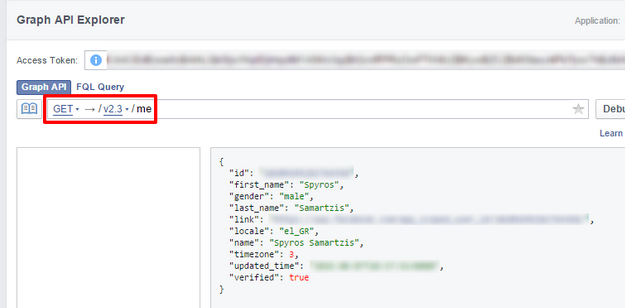
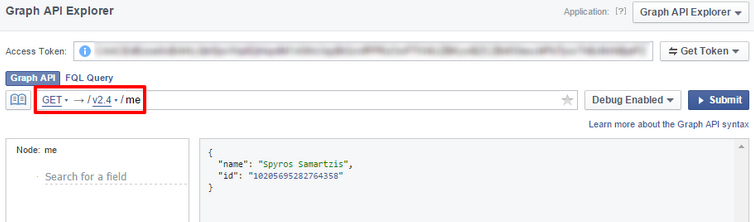
Now it's time to fix it!
We have two immediate options to solve this issue: one for DNN 7.4.1 and another for versions DNN 7.4.1 (280) and 7.4.2 (BETA):
- To fix this issue in DNN 7.4.1, we just need to copy the modified DLLs into our bin folder so that the necessary fields are explicitly required by the API call. You can download the DLLs from the following link.
- If we are using DNN 7.4.1 (280), the “simplest” option is to update to DNN 7.4.2, since this version includes the necessary changes in the OAuthClientBase class. This way, we only need to install DotNetNuke.Authentication.Facebook.dll in the bin folder. Once this is done, you should remember that even if you update DNN, the Authentication Provider will not be updated automatically, so you’ll need to do it manually via Hosts > Extensions > Authentication Providers.
This way, we can ensure that our Facebook login or registration continues working without having to modify any code. If you cannot afford to update to 7.4.2 and want to venture into modifying the involved .cs files and recompiling them, I recommend carefully reading the responses to the issue on DNNTracker https://dnntracker.atlassian.net/browse/DNN-7446.