For years, web development in .NET was divided into two worlds: the backend in ASP.NET / ASP.NET Core, where the business logic resides, and the frontend in JavaScript or TypeScript, supported by frameworks like React, Angular, or Vue.
This approach worked, but it led to code duplication, complexity, and higher maintenance costs.
That’s why Blazor emerged, to unify full-stack web development in .NET, using C# end-to-end, reducing duplication, and boosting productivity.
The challenges of traditional .NET web development
In most companies, the main issues with traditional .NET web development are:
-
Backend in ASP.NET / ASP.NET Core
-
Frontend in JavaScript or TypeScript
-
Different frameworks and specialized teams
-
Duplicate models and validations
This results in:
Blazor: the revolution in .NET web application development

According to BuiltWith, there are over 32,000 active production sites using Blazor as a web framework, showing that it is not just an experimental technology but a proven, real-world option.
Additionally, based on the same data, more than 1,500 Blazor sites are among the top 1 million websites by web traffic, indicating that companies and high-visibility projects are also adopting this approach.
The reason is that with Blazor:
-
Teams can use C# for both frontend and backend, eliminating exclusive dependency on JavaScript.
-
Model and validation duplication is reduced, increasing consistency.
-
Architecture is simplified and project delivery is accelerated.
In this way, Blazor enables optimized, agile, and scalable web application development in .NET.
Execution models in Blazor
Blazor offers different execution models to adapt to various development scenarios and performance requirements. These models allow you to choose the best option based on the specific needs of your application, whether in terms of interactivity, performance, or control over business logic. The three main execution models in Blazor are:
- Blazor Server
- Blazor WebAssembly
- Blazor Hybrid
|
Model
|
Main Advantage
|
Description
|
Recommended Use
|
|
Blazor Server
|
Fast initial load, centralized control
|
All logic runs on the server, and the client communicates via WebSockets (SignalR). Ideal for internal applications where security and centralized control are critical.
|
Intranets, dashboards, internal apps
|
|
Blazor WebAssembly
|
Maximum interactivity, local execution
|
The application runs directly in the browser via WebAssembly, providing smooth user experiences and offline capability (when configured as a PWA).
|
Highly interactive apps, offline-enabled apps
|
|
Blazor Hybrid
|
Combines prerendering and local component execution
|
Allows combining server prerendering with local component interactivity. Optimizes initial load speed and user experience. This Blazor model has been optimized in .NET 10 and later versions.
|
Public websites and highly interactive areas
|
Component-based architecture: scalability and clarity
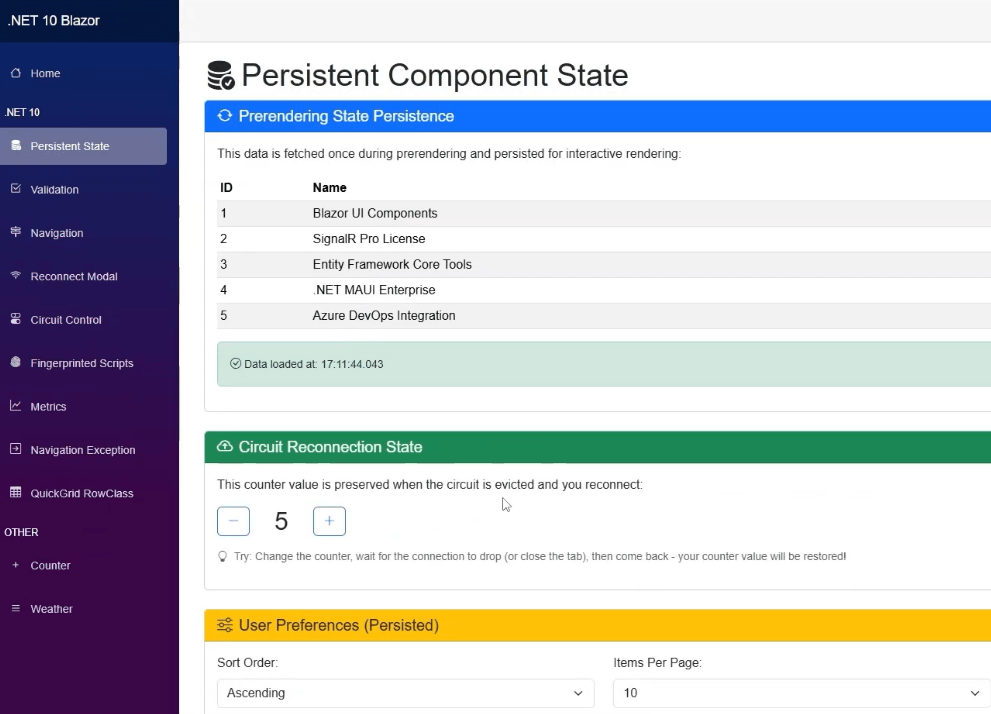
Blazor adopts a component-based approach, similar to modern frameworks like React or Angular, which enables:
- Code reuse across pages and projects
- Application scalability without losing structure
- Clear UI organization and separation of concerns
- Minimal learning curve for teams familiar with modern frameworks, resulting in faster delivery and improved maintainability
Navigation, routing, and 404 pages with Blazor and .NET
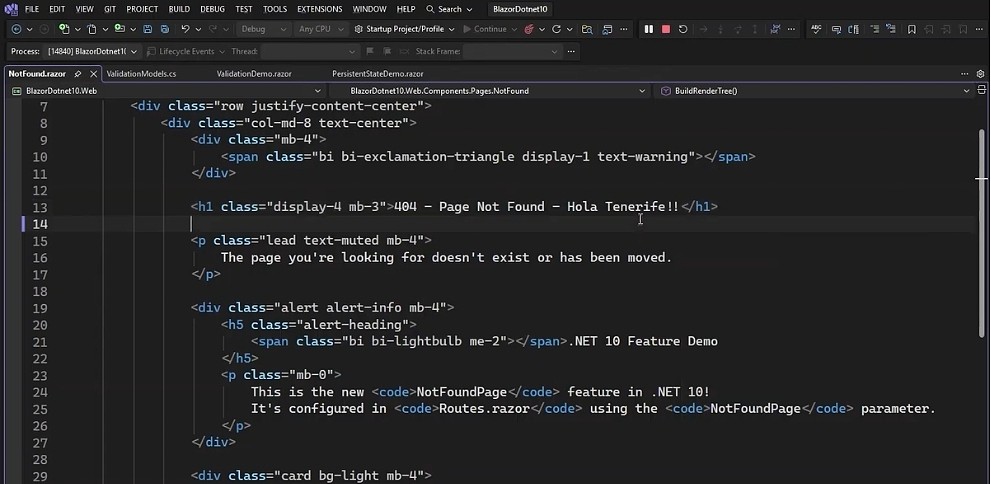
Blazor has significantly improved navigation and routing in its latest versions, especially since .NET 8, with a key feature known as Enhanced Navigation. This functionality allows partial page updates, reducing the need to reload the entire document and improving web application performance.
The NavLink component now accurately handles active links, including URL parameters and fragments, while the Router enables direct configuration of a NotFound (404) page without additional instrumentation or JavaScript.
These navigation and routing enhancements—available in earlier versions and further refined in .NET 8 and .NET 10—provide a smoother user experience, reduce navigation errors, and simplify route management within Blazor web applications.
The advantages of Blazor in web application development with .NET
Blazor offers a range of key benefits and advantages for web application development with .NET:
-
Single-language development using C# for both frontend and backend
-
Reusable components
-
Component-scoped CSS
-
Shared validation between client and server
-
Built-in performance metrics
-
Integration with .NET CI/CD pipelines
-
Reduced dependency on JavaScript
-
Faster and more scalable development
-
Greater consistency between frontend and backend
-
Optimized resource management and performance
This combination makes Blazor a powerful choice for .NET web application development, providing faster, more consistent, and easier-to-maintain solutions.
Blazor improvements in .NET 10
Blazor for .NET 10 introduces key enhancements and optimizations that directly impact development and user experience (UX), several of which have been significantly improved in this version:
-
Optimized Hybrid Blazor: Although Hybrid Blazor was introduced in earlier versions like .NET 6, .NET 10 brings major performance improvements, enabling a combination of server prerendering with local component execution, optimizing initial load speed and interactivity.
-
Prerendering and state persistence: Prerendering has existed in previous versions, but .NET 10 improves state persistence across reconnections, preventing flashes or data loss and enhancing the user experience.
-
Advanced form validation: Advanced validation, introduced in recent versions like .NET 7, is further enhanced in .NET 10 with improved DataAnnotations, supporting nested objects, complex structures, and custom attributes for advanced business rules such as anti-bot detection.
-
Reconnection and circuit control: Improvements in reconnection and circuit control, introduced earlier, are optimized in .NET 10 with customizable reconnection UI, JavaScript-based circuit management, and session handling, increasing application stability.
-
Enhanced observability: While performance and rendering metrics were already available in previous versions, .NET 10 better integrates these metrics with Aspire and OpenTelemetry, providing more detailed insights into circuit performance and duration.
-
Asset and CSS management: Resource fingerprinting and component-scoped CSS existed before, but .NET 10 further optimizes CSS isolation per component and resource loading management, enhancing overall application performance.
These improvements make Blazor in .NET 10 more efficient, reliable, and developer-friendly, providing a superior experience for building modern web applications.
When to choose Blazor for a .NET project
Blazor is ideal for:
It helps reduce costs, streamline teams, and accelerate development in .NET.
Blazor as a competitive advantage for companies using .NET
According to the Stack Overflow Developer Survey 2024 (Statista), around 25.2% of developers use the .NET framework (5+) in their projects. For organizations already invested in the .NET ecosystem, Blazor provides a competitive advantage by unifying full-stack .NET web development, boosting productivity, and reducing the complexity of maintaining separate frontend and backend projects.
By working with a single language (C#) and a unified stack, teams reduce the complexity of managing separate backend and frontend projects, significantly decreasing code duplication and errors arising from synchronizing models and validations across different systems.
Additionally, Blazor accelerates the delivery of new features through reusable components and shared logic, ensuring technical consistency throughout the solution. This results in more robust applications, easier maintenance, and a clear competitive edge, allowing businesses to respond faster to requirements without sacrificing quality or security.
Blazor and the future of web development in .NET
Blazor consolidates full-stack web development in .NET, offering reusable components, flexible interactivity, and a consistent development experience.
With Blazor in .NET 10, improvements in prerendering, advanced validation, customizable reconnection, asset management, and observability strengthen its position as a reference framework for modern enterprise applications in C#.
If you want to optimize your .NET projects and take full advantage of Blazor, at Intelequia we are ready to help. Contact us and discover how we can turn your ideas into modern, secure, and scalable web applications.